|
Broaden your Horizons
Digital technology takes document
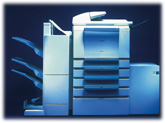
copying into a new dimension. Utilise it to the full with the PageStation
GP405 - a versatile copier that combines creative editing facilities with
a superb range of options for document finishing. Its functionality can
even be extended to include, network laser printing, scanning and faxing,
accommodating all your future needs.
The
Art of Creative Copying
Advanced copying functions are easy to
perform with the PageStation GP405 - simply follow the prompts on the
copier's intuitive touch-screen display. Commonly used command sequences
can be stored in memory for instant recall via the display screen. There
is even a Paper Supply Indicator to help you avoid running out of paper
during a long copying job.
A
Choice of Finishing Touches
A
range of optional finishing units are available for the PageStation GP405,
enabling you to group, collate and staple your documents automatically.
The GP405's Scan Once, Print Many technology facilitates the production
and collation of complete document sets, rather than outputting them page
by page. Each set is offset from the next for easy retrieval from the
output tray.
Network Control
At the heart of the PageStation GP405
is the powerful Canon X3e Printer Controller which operates in both
Windows and Macintosh environments. Incorporating Canon's unique NetSpot
network management software, the GP405 can be effortlessly managed and
monitored remotely across the network. You can set up private mailboxes
for saving confidential print jobs by adding an optional memory expansion
board. You can check the printing status of any document, cancel printing
if necessary, and even check the Print History screen to access details
from the system's printing log, using integral Fiery Webtools. it is
possible for network users to reprint the jobs and retrieve printer status
information via the internet or company intranet using a web browser.
Supreme Fax Functionality
When faxing, images can be transmitted
at up to 400 dots per inch resolution, and broadcast to multiple
destinations simultaneously. When scanned via the optional Document
Feeder, each page is stamped to show that it has been sent. If you don't
want to leave your desk, simply compose an outgoing fax on your computer
screen and send it directly to an individual or group of recipients
without the need for a hard copy.
Quality Imagery
The PageStation GP405's Scan Once,
Print Many technology ensures reproduction of the highest quality. Images
are scanned into memory before being reproduced so that every document is
a superb first generation copy. Print jobs are produced at a high
resolution of 1200 (equiv.) x 600 dots per inch with Resolution
Enhancement Technology which smoothes the edges of every text character
whilst also sharpening graphics.
Network Scanning
Using the optional AXIS network scan
server, and GP405, documents are converted into electronic format prior to
distribution across workgroups, the enterprise, or the World Wide Web. At
the touch of a button users can effortlessly scan documents, photographs,
and reports before distributing them anywhere - from individuals to
distribution lists, across the office or around the world.
The Finishing Touch
The PageStation GP405 possesses
exceptional document finishing capabilities, such as the ability to
produce and collate complete document sets, rather than outputting them
page by page. Each set is offset from the next for easy retrieval from an
output tray. If you need to produce OHP transparencies for a presentation,
the GP405 will print directly onto film, interleaving each slide with
paper for easy separation. It can even produce single or double-sided
stapled booklets using the optional Saddle Finisher with Saddle-Stitch
Stapling.
Efficient and Responsible
When the PageStation GP405 is going to
stand idle for prolonged periods, you can cut your electricity bill by
engaging the Energy Saver mode which reduces the temperature of the fixing
unit. You can rely on the Paper Supply Indicator to help you avoid running
out of paper during long copying jobs and there is even a password
controlled Departmental ID Management feature which allows you to monitor
the volume of copies produced by users in different departments. To
prevent unauthorised usage, copies can only be processed when the correct
password is given.
 |
|
|
|
Digital Copier, Network Scanner, Printer and
Fax
40
A4 pages per minute
81sec
maximum warm up time
6sec
maximum first copy out time
Output
sizes from A3 to A6R
Unique
Canon NetSpot network management software
Continuous
Duplex System
Versatile
Editing Features
Energy
Saver Mode
Touch
Screen Display
|